Trackballs Guide to Design, Functions, and Everyday Computer Navigation
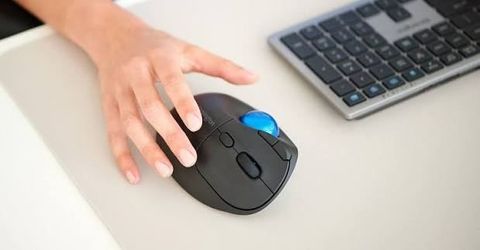
A trackball is a pointing device used to move a cursor on a computer screen by rotating a ball with the fingers, thumb, or palm.
Unlike a conventional mouse, which moves across a desk or another surface, a trackball remains stationary while the user controls the ball. This design makes it useful in everyday computing, industrial control rooms, medical equipment, and specialized computer systems.
Trackballs developed as an alternative to earlier pointing and navigation technologies. Over time, mechanical components were replaced or supplemented by electronic sensors and optical tracking systems. Modern designs vary in size, shape, mounting method, and resistance to environmental conditions.
Industrial trackball manufacturers produce devices for environments where ordinary computer peripherals may not meet operational requirements. These include industrial panel mount trackballs, medical grade trackball devices, and rugged pointing devices designed for demanding workplaces. Understanding their construction and functions helps explain how trackballs support different types of computer navigation.
How Trackballs Work
A trackball typically contains a ball, a supporting mechanism, sensors, and electronic components that translate ball movement into cursor movement. In optical designs, sensors detect changes in the ball's position and send corresponding signals to the connected computer.
Users can move the cursor in different directions without shifting the device itself. Buttons, scroll controls, or additional switches may provide functions similar to those found on a conventional mouse.
Common Trackball Designs
Trackballs come in several configurations, depending on how they are operated and where they are installed.
Desktop trackballs use a stationary base and a ball operated by the thumb or fingers.
Industrial panel mount trackballs fit into equipment panels or control consoles.
Optical trackball modules for OEMs are components incorporated into larger electronic products.
Sealed industrial trackball controllers are designed to limit the entry of dust, moisture, or other contaminants, depending on their specified protection rating.
Heavy duty trackball pointing devices are intended for repeated use in demanding environments.
These configurations differ in ergonomics, installation requirements, cleaning procedures, and environmental resistance.
Importance
Trackballs are useful when cursor control must take place within a limited space or from a fixed workstation. They can reduce the need for a clear surface around the pointing device, making them relevant to control panels, compact workstations, and specialized computer interfaces.
For everyday users, trackballs provide another way to navigate applications, documents, and digital workspaces. Some people prefer their stationary design because it changes how hand and arm movements are performed. Comfort, however, depends on the device shape, hand position, operating technique, and duration of use.
Applications Across Different Industries
Trackballs are used in several environments, each with specific operating requirements.
Manufacturing: Operators may use industrial trackball controllers to navigate machine interfaces, inspect production information, or interact with control software.
Healthcare: Medical grade trackball devices can be incorporated into equipment interfaces where cleaning procedures and material compatibility are important.
Transportation and navigation: Trackballs can provide cursor control in compact consoles and specialized monitoring stations.
Defense and aerospace: Military grade rugged trackballs may be designed for vibration, temperature variation, or other environmental conditions specified for particular applications.
Computing and design: Desktop trackballs can support routine navigation, editing, and other cursor-based activities.
The suitability of a device depends on its documented specifications and the conditions in which it will operate.
Practical Design Considerations
Choosing an appropriate trackball design involves several factors. Ball diameter, button placement, mounting depth, connection type, and cleaning requirements can influence usability and installation.
Environmental protection is another consideration. A rugged industrial trackball mouse may have a reinforced enclosure, sealed controls, or materials selected for particular operating conditions. These features do not automatically make every model suitable for every industrial environment.
Recent Updates
Developments in trackball technology from 2024 through 2026 generally reflect broader changes in electronic input devices, industrial computing, and human-machine interfaces. Current designs continue to use optical sensing, compact electronics, configurable controls, and different enclosure designs to address specific operating environments.
Optical Sensing and Embedded Integration
Optical sensing allows a trackball to detect movement electronically without relying solely on traditional mechanical tracking arrangements. Depending on the design, this can reduce certain mechanical wear points and support consistent cursor detection.
Optical trackball modules for OEMs are used when manufacturers need to incorporate cursor control into a larger product. Integration may involve mounting dimensions, electrical interfaces, firmware compatibility, and the physical layout of the surrounding equipment.
Rugged Construction and Environmental Protection
Industrial trackball suppliers serve applications that may involve dust, moisture, vibration, temperature changes, or frequent cleaning. Sealed designs can help limit contaminant entry when their construction and protection ratings are appropriate for the environment.
Military grade rugged trackballs and sealed industrial trackball controllers may use specialized housings, switches, or materials. Actual performance depends on the model's specifications and testing, rather than its general product category alone.
Ergonomics and Specialized Interfaces
Trackball design continues to account for hand positioning, control placement, and the relationship between the device and the operator. Thumb-operated and finger-operated models provide different movement patterns, while configurable buttons can support application-specific tasks.
Custom trackball input devices may also be developed for equipment with unusual mounting requirements or specialized control layouts. Such designs require attention to accessibility, compatibility, maintenance, and operator training.
The following table summarizes common design differences.
| Trackball type | Main design feature | Typical application |
|---|---|---|
| Desktop trackball | Stationary base | Everyday computing |
| Panel mount trackball | Fixed installation | Industrial consoles |
| Optical trackball module | Electronic movement sensing | Embedded equipment |
| Sealed trackball controller | Environmental protection features | Industrial workstations |
| Medical grade trackball | Materials and design suited to specified cleaning requirements | Healthcare equipment |
| Rugged trackball | Construction for defined operating conditions | Specialized field systems |
Tools and Resources
Several resources can help users understand trackball specifications and assess compatibility with their intended applications.
Product Documentation and Technical Specifications
Documentation from industrial trackball manufacturers may include dimensional drawings, mounting instructions, electrical connection details, operating temperature ranges, and environmental protection ratings. These details help determine whether a device can fit into an existing console or electronic system.
For panel installations, dimensional drawings and mounting templates are particularly useful. They show the required opening, available clearance, and position of attachment points.
Compatibility and Installation Resources
Before integrating a trackball, users may need to review the following:
Connection interfaces, such as USB or other supported communication methods.
Operating system compatibility and any required drivers.
Mounting dimensions and available installation space.
Button functions and supported configuration options.
Cleaning instructions and environmental protection documentation.
Maintenance requirements for the ball, sensors, and surrounding components.
For custom trackball input devices, engineering drawings and interface specifications help clarify how the component will connect to the larger system.
Testing and Evaluation
A practical evaluation can include checking cursor accuracy, movement response, button operation, and ease of cleaning. Industrial environments may require additional tests based on vibration, temperature, moisture, or other relevant operating conditions.
For medical and specialized industrial equipment, applicable standards and documented testing requirements should be reviewed as part of the overall equipment assessment.
FAQs
What are industrial panel mount trackballs used for?
Industrial panel mount trackballs are installed directly into equipment panels or control consoles. They allow operators to navigate computer interfaces where desk space is limited or a fixed control arrangement is required.
How does a rugged industrial trackball mouse differ from a regular mouse?
A rugged industrial trackball mouse is designed for stationary operation and may include construction features intended for demanding environments. A regular mouse generally moves across a surface, while a trackball controls the cursor through ball rotation.
What are medical grade trackball devices?
Medical grade trackball devices are pointing devices designed for specified healthcare equipment and operating conditions. Their materials, enclosure design, and cleaning compatibility should be evaluated against the relevant equipment requirements.
What should be checked when selecting sealed industrial trackball controllers?
Important factors include the documented ingress protection rating, mounting dimensions, connection type, operating temperature range, and cleaning requirements. The specified protection level should match the intended environment.
What are optical trackball modules for OEMs?
Optical trackball modules for OEMs are components integrated into larger products or electronic systems. They use optical sensing to detect ball movement and provide cursor input through a supported electrical interface.
Conclusion
Trackballs provide cursor control through a rotating ball while keeping the device itself stationary. Their designs range from desktop peripherals to industrial panel mount trackballs, medical grade devices, and rugged controllers for specialized environments. Optical sensing, enclosure design, mounting compatibility, and ergonomics are important considerations when evaluating these devices. Understanding their specifications and intended operating conditions helps explain how trackballs support different computing and control applications.

Related Post...
Single Board Computers Overview: Key Features and Practical Applications
Updated: October 19, 2026
Read More
Artificial Intelligence: An Overview of Modern AI Technologies and Applications
Updated: October 16, 2026
Read More